2 Getting Started
In this guide you are going to explore HAL (Hypertext Application Language) support in Grails, using JSON views (provided by the Grails Views library).
Hypertext Application Language (HAL) is an Internet Draft (a "work in progress") standard convention for defining hypermedia such as links to external resources within JSON or XML code.
— Wikipedia
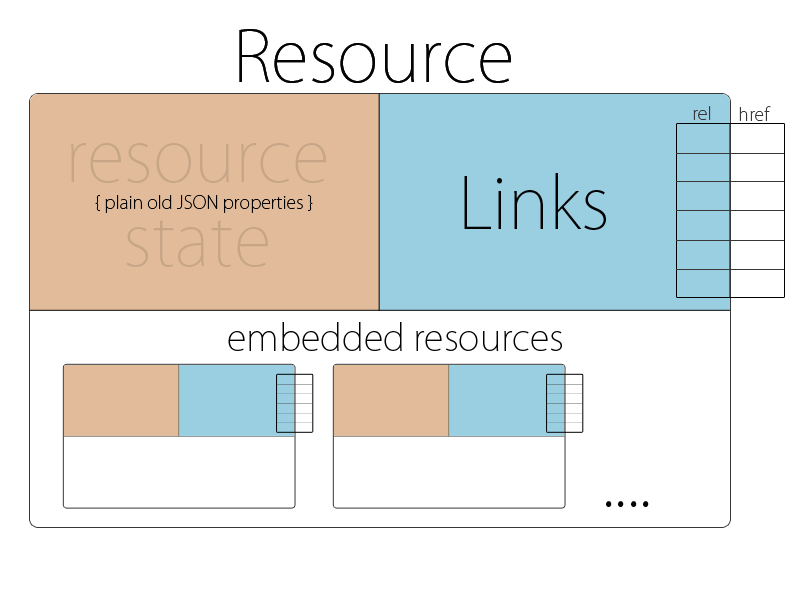
The purpose of HAL is make APIs "discoverable" - it defines a set of conventions that allow consumers of your API to follow links between resources, as well as providing pagination and other convenience features for "exploring" an API. HAL is a popular standard for implementing HATEOAS (Hypermedia As The Engine Of Application State) architecture, which is an extension of basic REST architecture.
Figure 1. HAL Resource Structure, from http://stateless.co
| For a thorough introduction to HAL, check out the overview and specification at the following URL: http://stateless.co/hal_specification.html |
Grails provides support for HAL through JSON views, which are part of the Grails Views library. You can use this library in an existing application following the installation steps in the documentation, or you can create a new application using either the rest-api profile or one of the frontend profiles (angular, angular2 and react) which extend the rest-api profile.
In this guide, we have provided a basic Grails 4 application using the rest-api profile in the initial project. We have also included a few domain classes to expose via our API. You may generate your own project if you wish (in which case you will need to copy the domain classes from initial/grails-app/domain/ into your own project), or simply use the initial project to follow along with the guide.
2.1 What You will Need
To complete this guide, you will need the following:
-
Some time on your hands
-
A decent text editor or IDE
-
JDK 11 or greater installed with
JAVA_HOMEconfigured appropriately
2.2 How to Complete the Guide
To get started do the following:
-
Download and unzip the source
or
-
Clone the Git repository:
git clone https://github.com/grails-guides/using-hal-with-json-views.git
The Grails guides repositories contain two folders:
-
initialInitial project. Often a simple Grails app with some additional code to give you a head-start. -
completeA completed example. It is the result of working through the steps presented by the guide and applying those changes to theinitialfolder.
To complete the guide, go to the initial folder
-
cdintograils-guides/using-hal-with-json-views/initial
and follow the instructions in the next sections.
You can go right to the completed example if you cd into grails-guides/using-hal-with-json-views/complete
|
