

Building a Swift iOS Client powered by a Grails backend
This guide demonstrates how you can use Grails as the backend of an iOS app built with Swift
Authors: Sergio del Amo
Grails Version: 4
1 Grails Training
Apache Grails Training
Apache Grails is now part of the Apache Software Foundation. The community-maintained training catalog is being migrated; in the meantime see the Learning page for current resources, recorded talks, and links to other community-supplied training material.
2 Getting Started
In this guide you are going to build a Grails application which will serve as a company intranet backend. It exposes a JSON API of company announcements.
Additionally, you are going to build an iOS App, the intranet client, which consumes the JSON API offered by the backend.
The guide explores the support of diffent API versions.
2.1 What you will need
To complete this guide you will need the following:
-
Some time on your hands
-
A decent text editor or IDE
-
JDK 1.7 or greater installed with
JAVA_HOMEconfigured appropriately -
The latest stable version of Xcode. This guide was written with Xcode 8.2.1
2.2 How to complete the guide
To complete this guide, you will need to checkout the source from Github and work through the steps presented by the guide.
To get started do the following:
-
Download and unzip the source or if you already have Git:
git clone https://github.com/grails-guides/building-an-ios-swift-client-powered-by-a-grails-backend.git
To follow the Grails part:
-
cdintograils-guides/building-an-ios-swift-client-powered-by-a-grails-backend/initial
Alternatively, if you already have Grails installed then you can create a new application using the following command in a Terminal window:
$ grails create-app intranet.backend.grails-app --profile rest-api
$ cd grails-app
When the create-app command completes, Grails will create a grails-app directory with an application configured to create a REST application (due to the use of the parameter profile=rest-api ) and configured to use the hibernate feature with an H2 database.
You can go right to the completed Grails example if you cd into grails-guides/building-an-ios-swift-client-powered-by-a-grails-backend/complete
|
To follow the iOS part:
-
cdintograils-guides/building-an-ios-swift-client-powered-by-a-grails-backend/initial-swift-ios -
Head on over to the next section
Alternatively, you can create an iOS app using the New Project Wizard of Xcode Studio as illustrated in the next screenshots.
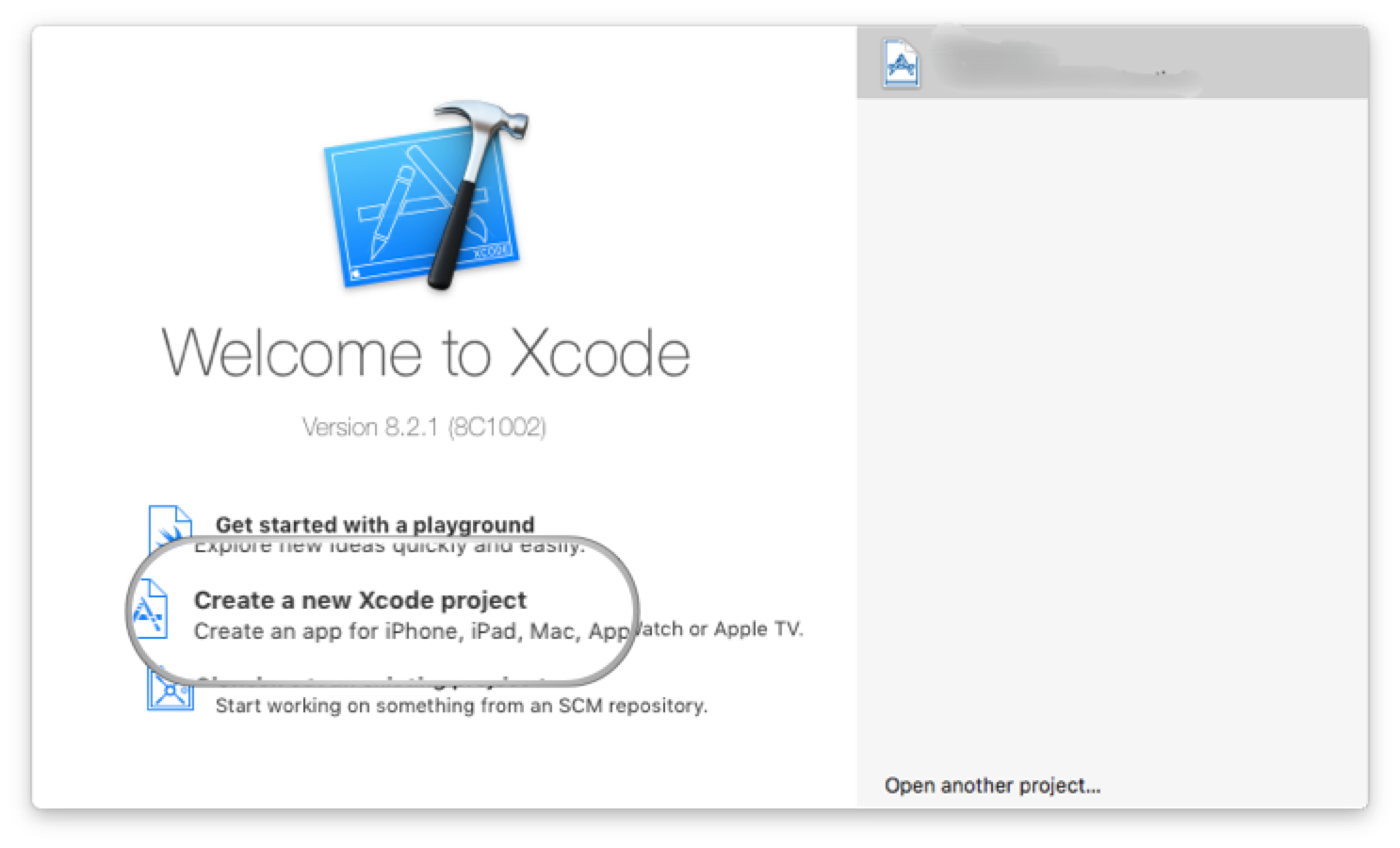
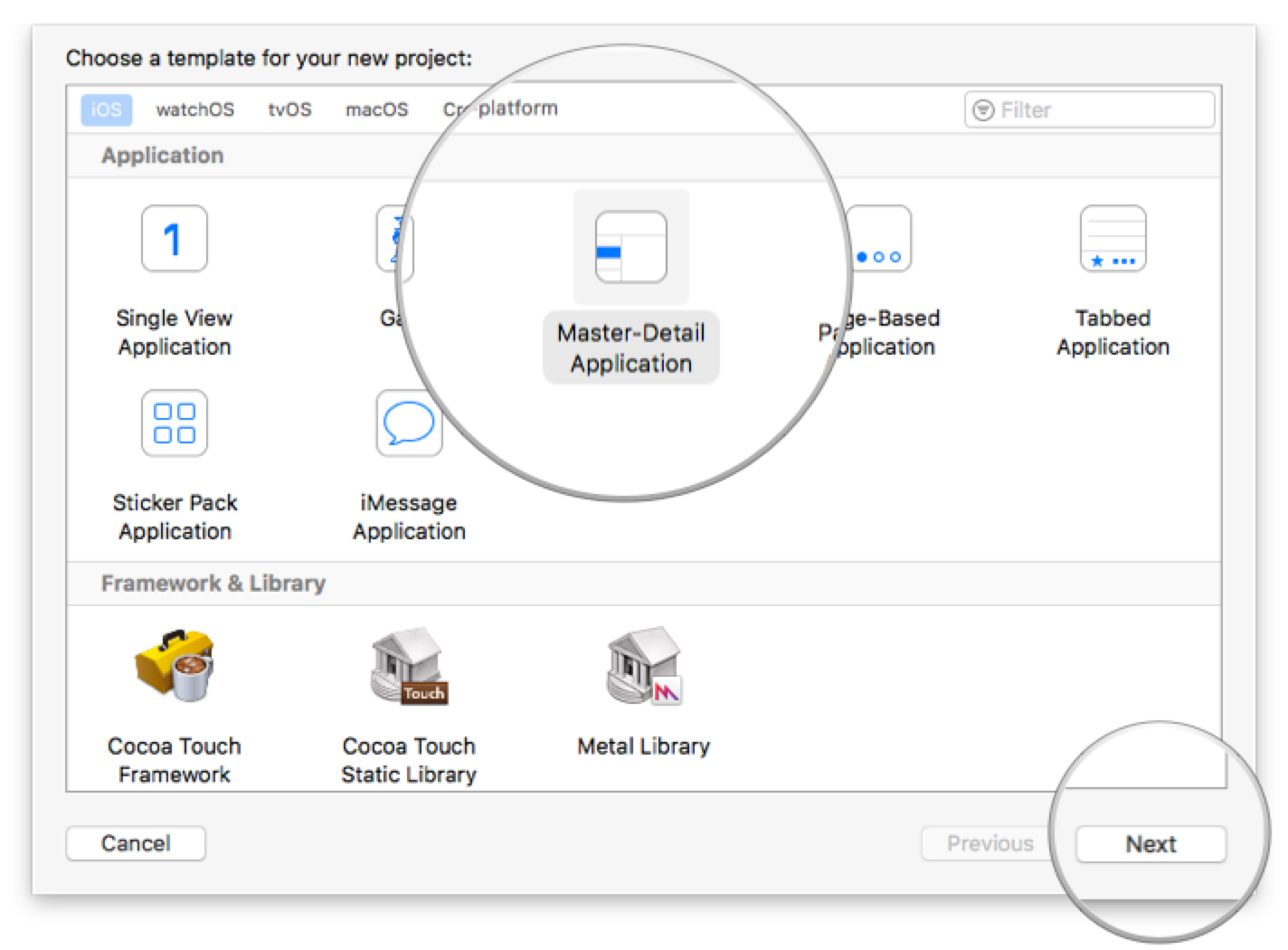
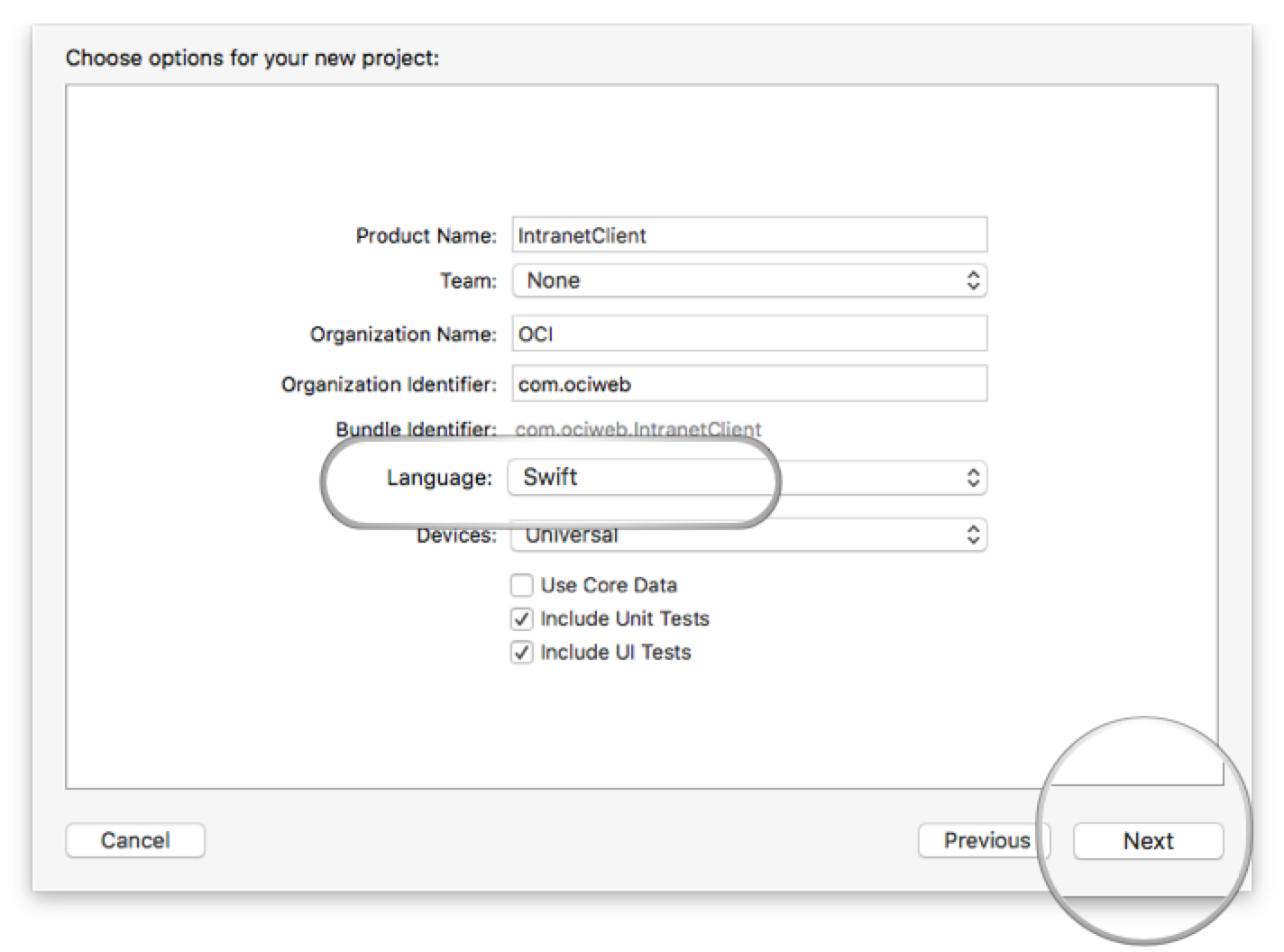
You can go right to the completed version 1 of the iOS example if you cd into grails-guides/building-an-ios-swift-client-powered-by-a-grails-backend/complete-swift-ios-v1
|
You can go right to the completed version 2 of the iOS example if you cd into grails-guides/building-an-ios-swift-client-powered-by-a-grails-backend/complete-swift-ios-v2
|
3 Overview
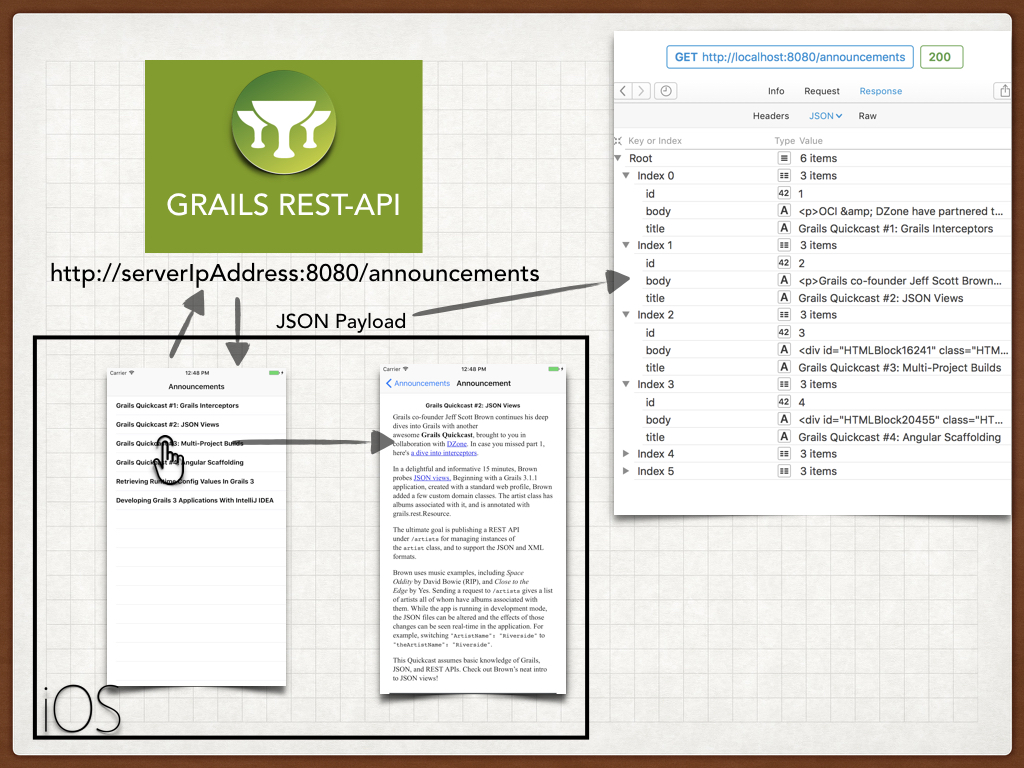
The next image illustrates the behavior of iOS app version 1. The iOS app is composed by two View Controllers.
-
When the iOS application initial screen loads, it requests an announcements list.
-
The Grails app sends a JSON payload which includes a list of announcements. For each announcement a unique identifier, a title and a HTML body is included.
-
The iOS app renders the JSON Payload in a UITableView
-
The user taps an announcement’s title and the app segues to a detail screen. The initial screen sends the detail screen the announcement identiifer, title and HTML body. The latter will be rendered in a UIWebView
4 Writing the Grails Application
Now you are ready to start writing the Grails application.
4.1 Create a Domain Class - Persistent Entities
We need to create persistent entities to store company announcements. Grails handles persistence with the use of Grails Domain Classes:
A domain class fulfills the M in the Model View Controller (MVC) pattern and represents a persistent entity that is mapped onto an underlying database table. In Grails a domain is a class that lives in the grails-app/domain directory.
Grails simplifies the creation of domain classes with the create-domain-class command.
 ./grailsw create-domain-class Announcement
| Resolving Dependencies. Please wait...
CONFIGURE SUCCESSFUL
Total time: 4.53 secs
| Created grails-app/grails/company/intranet/Announcement.groovy
| Created src/test/groovy/grails/company/intranet/AnnouncementSpec.groovy
Just to keep it simple, we assume the company announcements just contain a title and a HTML body. We are going to modify the domain class generated in the previous step to store that information.
package intranet.backend

class Announcement {

    String title
    String body

    static constraints = {
        title size: 0..255
        body nullable: true
    }

    static mapping = {
        body type: 'text'  (1)
    }
}| 1 | it enables us to store strings with more than 255 characters in the body. |
4.2 Domain Class Unit Testing
Grails makes testing easier from low level unit testing to high level functional tests.
We are going to test the constraints we defined in the Announcement domain Class in constraints property. In particular nullability and length of both title and body properties.
package intranet.backend

import grails.testing.gorm.DomainUnitTest
import spock.lang.Specification

class AnnouncementSpec extends Specification implements DomainUnitTest<Announcement> {

    void "test body can be null"() {
        expect:
        new Announcement(body: null).validate(['body'])
    }

    void "test title can not be null"() {
        expect:
        !new Announcement(title: null).validate(['title'])
    }

    void "test body can have a more than 255 characters"() {

        when: 'for a string of 256 characters'
        String str = ''
        256.times { str += 'a' }

        then: 'body validation passes'
        new Announcement(body: str).validate(['body'])
    }

    void "test title can have a maximum of 255 characters"() {

        when: 'for a string of 256 characters'
        String str = ''
        256.times { str += 'a' }

        then: 'title validation fails'
        !new Announcement(title: str).validate(['title'])

        when: 'for a string of 256 characters'
        str = ''
        255.times { str += 'a' }

        then: 'title validation passes'
        new Announcement(title: str).validate(['title'])
    }
}
We can run the every test, including the one we just created, with the command test_app
 ./grailsw test-app
 | Resolving Dependencies. Please wait...
 CONFIGURE SUCCESSFUL
 Total time: 2.534 secs
 :complete:compileJava UP-TO-DATE
 :complete:compileGroovy
 :complete:buildProperties
 :complete:processResources
 :complete:classes
 :complete:compileTestJava UP-TO-DATE
 :complete:compileTestGroovy
 :complete:processTestResources UP-TO-DATE
 :complete:testClasses
 :complete:test
 :complete:compileIntegrationTestJava UP-TO-DATE
 :complete:compileIntegrationTestGroovy UP-TO-DATE
 :complete:processIntegrationTestResources UP-TO-DATE
 :complete:integrationTestClasses UP-TO-DATE
 :complete:integrationTest UP-TO-DATE
 :complete:mergeTestReports

 BUILD SUCCESSFUL

 | Tests PASSED
4.3 Versioning
It is important to think about API versioning from the beginning, especially when you create an API consumed by mobile phone applications. Users will run different versions of the app, and you will need to version your API to create advanced functionality but keep supporting legacy versions.
Grails allows multiple ways to Version REST Resources.
-
Using the URI
-
Using the Accept-Version Header
-
Using Hypermedia/Mime Types
In this guide we are going to version the API using the Accept-Version header.
Devices running version 1.0 will invoke the announcements enpoint passing the 1.0 in the Accept Version HTTP Header.
$ curl -i -H "Accept-Version: 1.0" -X GET http://localhost:8080/announcementsDevices running version 2.0 will invoke the announcements enpoint passing the 2.0 in the Accept Version Header.
$ curl -i -H "Accept-Version: 2.0" -X GET http://localhost:8080/announcements4.4 Create a Controller
We create a Controller for the Domain class we previously created. Our Controller extends RestfulController. This
will provide us RESTful functionality to list, create, update and delete Announcement resources using
different HTTP Methods.
package intranet.backend.v1

import grails.rest.RestfulController
import intranet.backend.Announcement

class AnnouncementController extends RestfulController<Announcement> {
    static namespace = 'v1' (1)
    static responseFormats = ['json'] (2)

    AnnouncementController() {
        super(Announcement)
    }
}| 1 | this controller will handle v1 of our api |
| 2 | we want to respond only JSON Payloads |
Url Mapping
We want our endpoint to listen in /announcements instead of /announcement. Moreover, we want previous controller for which we declared a namespace of v1 to handle the requests with the Accept-Version Http Header set to 1.0.
Grails enables powerful URL mapping configuration to do that. Add the next line to the mappings closure:
get "/announcements"(version:'1.0', controller: 'announcement', namespace:'v1')4.5 Loading test data
We are going to populate the database with several announcements when the application startups.
In order to do that, we edit grails-app/init/grails/company/intranet/BootStrap.groovy.
package grails.company.intranet

class BootStrap {

    def init = { servletContext ->
        announcements().each { it.save() }
    }
    def destroy = {
    }

    static List<Announcement> announcements() {
        [
                new Announcement(title: 'Grails Quickcast #1: Grails Interceptors'),
                new Announcement(title: 'Grails Quickcast #2: JSON Views')
        ]
    }
}
Announcements in the previous code snippet don’t contain body content
to keep the code sample small. Checkout grails-app/init/intranet/backend/BootStrap.groovy to see the complete code.
|
4.6 Functional tests
Functional Tests involve making HTTP requests against the running application and verifying the resultant behavior.
We use the Rest Client Builder Grails Plugin whose dependency is added when we create an app with the rest-api profile.
{sourceDir}
package intranet.backend

import grails.testing.mixin.integration.Integration
import grails.testing.spock.OnceBefore
import grails.web.http.HttpHeaders
import io.micronaut.http.HttpRequest
import io.micronaut.http.HttpResponse
import io.micronaut.http.HttpStatus
import io.micronaut.http.client.HttpClient
import spock.lang.AutoCleanup
import spock.lang.Shared
import spock.lang.Specification


@Integration
class AnnouncementControllerSpec extends Specification {

    @Shared
    @AutoCleanup
    HttpClient client

    @OnceBefore
    void init() {
        String baseUrl = "http://localhost:$serverPort"
        this.client  = HttpClient.create(baseUrl.toURL())
    }

    def "test body is present in announcements json payload of Api 1.0"() {
        given:
        HttpRequest request = HttpRequest.GET("/announcements/").header("Accept-Version", "1.0")

        when: 'Requesting announcements for version 1.0'
        HttpResponse<List<Map>> resp = client.toBlocking().exchange(request, List) (1)

        then: 'the request was successful'
        resp.status == HttpStatus.OK (3)

        and: 'the response is a JSON Payload'
and: 'json payload contains the complete announcement'| 1 | serverPort property is automatically injected. It contains the random port where the Grails app runs during the functional test |
| 2 | Pass the api version as an Http header |
| 3 | Verify the response code is 200; OK |
| 4 | Body is present in the JSON paylod |
Grails command test-app runs unit, integration and functional tests.
4.7 Running the Application
To run the application use the ./gradlew bootRun command which will start the application on port 8080.
5 Writing the iOS Application
5.1 Fetching the Announcements
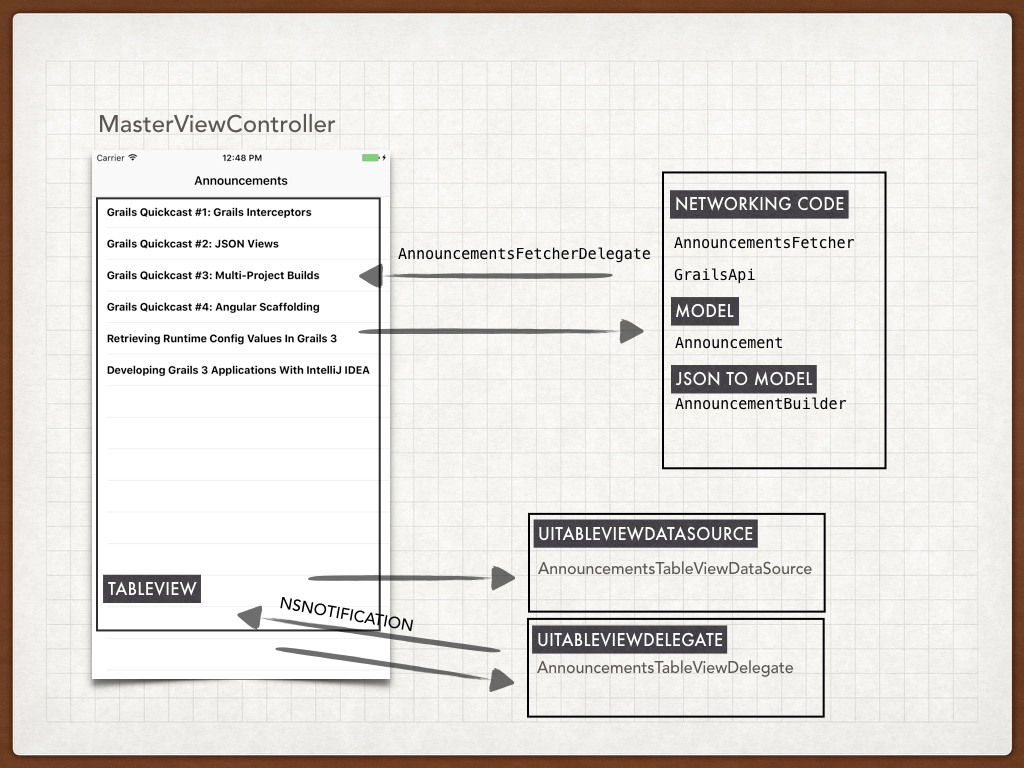
Next image illustrates the classes involved in the fetching and rendering of the announcements exposed by the Grails application.
5.2 Model
The announcements sent by the server are gonna be rendered into an object:
class Announcement {
    let primaryKey: Int
    let title: String
    var body: String?

    init(primaryKey: Int, title: String) {
        self.primaryKey = primaryKey
        self.title = title
    }
}
5.3 Json to Model
To build a Model object from Data, for example a network request, we use a builder class
import Foundation

class AnnouncementBuilder {

    func announcementsFromJSON(_ data: Data?) -> [Announcement] {
        let json = try? JSONSerialization.jsonObject(with: data!, options: [])
        var announcements = [Announcement]()
        if let array = json as? [Any] {
            for object in array {
                if let dict = object as? Dictionary<String, AnyObject> {
                    if let title = dict["title"] as? String, let primaryKey = dict["id"]  as? Int {
                        let announcement = Announcement(primaryKey: primaryKey, title: title)
                        if let body = dict["body"]  as? String {
                            announcement.body = body
                        }
                        announcements.append(announcement)
                    }
                }
            }
        }
        return announcements
    }
}
5.4 Networking code
We use NSURLSession to connect to the Grails API. Several constants are set in GrailsFetcher
struct GrailsApi {
    static let serverUrl = "http://192.168.1.40:8080" (1)
    struct Announcements {
        static let Path = "announcements" (2)
    }
    static let version = "1.0" (3)
}| 1 | Grails App server url. |
| 2 | The path we configured in the Grails app in UrlMappings.groovy |
| 3 | The version of the API |
| You may need to change the ip address to match your local machine. |
import Foundation

class AnnouncementsFetcher : NSObject, URLSessionDelegate {

    weak var delegate:AnnouncementsFetcherDelegate?
    let builder = AnnouncementBuilder()

    func fetchAnnouncements() {
        let url = URL(string: "\(GrailsApi.serverUrl)/\(GrailsApi.Announcements.Path)")!
        let req = NSMutableURLRequest(url:url)
        req.setValue(GrailsApi.version, forHTTPHeaderField: "Accept-Version") (1)
        let config = URLSessionConfiguration.default
        let session = URLSession(configuration: config, delegate: self, delegateQueue: OperationQueue.main)

        let task = session.dataTask(with: req as URLRequest) { (data, response, error) in
            if error != nil {
                if let delegate = self.delegate {
                    delegate.announcementsFetchingFailed()
                }
                return
            }
            let announcements = self.builder.announcementsFromJSON(data)
            if let delegate = self.delegate {
                delegate.announcementsFetched(announcements)
            }

        }
        task.resume()

    }
}| 1 | We set the Accept-Version Http header for every request. |
Once we get a list of announcements, we communicate the response to classes implementing the delegate
protocol AnnouncementsFetcherDelegate: class {

    func announcementsFetchingFailed()

    func announcementsFetched(_ announcements: [Announcement])
}
The MasterViewController implements fetcher delegate protocol, thus it receives the announcements
import UIKit

class MasterViewController: UITableViewController, AnnouncementsFetcherDelegate {

    var detailViewController: DetailViewController? = nil
    var objects = [Any]()

    var tableViewDataSource = AnnouncementsTableViewDataSource()
    var tableViewDelegate = AnnouncementsTableViewDelegate()
    let fetcher = AnnouncementsFetcher()

    // MARK: - LifeCycle

    override func viewDidLoad() {
        super.viewDidLoad()
        self.tableView.dataSource = self.tableViewDataSource
        self.tableView.delegate = self.tableViewDelegate
        self.fetcher.delegate = self
    }

    override func viewWillAppear(_ animated: Bool) {
        self.clearsSelectionOnViewWillAppear = self.splitViewController!.isCollapsed
        super.viewWillAppear(animated)
        self.registerNotifications()
        self.fetchAnnouncements() (1)
    }

    override func viewWillDisappear(_ animated: Bool) {
        super.viewWillDisappear(animated)
        self.unregisterNotifications()
    }

    // MARK: - Notifications

    func registerNotifications() {
        NotificationCenter.default.addObserver(
            self,
            selector: #selector(self.announcementTapped),
            name: Notification.Name("AnnouncementTappedNotification"),
            object: nil)
    }

    func unregisterNotifications() {
        NotificationCenter.default.removeObserver(
            self,
            name: Notification.Name("AnnouncementTappedNotification"),
            object: nil)
    }

    // MARK: - Private Methods

    @objc func announcementTapped(notification: NSNotification){

        let announcement = notification.object as! Announcement
        self.performSegue(withIdentifier: "showDetail", sender: announcement)
    }

    func fetchAnnouncements() {
        self.setNetworkActivityIndicator(true)
        self.fetcher.fetchAnnouncements()
    }

    func setNetworkActivityIndicator(_ visible: Bool) {
        UIApplication.shared.isNetworkActivityIndicatorVisible = visible
    }

    // MARK: - Segues

    override func prepare(for segue: UIStoryboardSegue, sender: Any?) {
        if segue.identifier == "showDetail" {
            let controller = (segue.destination as! UINavigationController).topViewController as! DetailViewController
            if let announcement = sender as? Announcement {
                controller.announcement = announcement
            }
            controller.navigationItem.leftBarButtonItem = self.splitViewController?.displayModeButtonItem
            controller.navigationItem.leftItemsSupplementBackButton = true
        }
    }

    // MARK: - AnnouncementsFetcherDelegate

    func announcementsFetchingFailed() {
        self.setNetworkActivityIndicator(false)
    }

    func announcementsFetched(_ announcements: [Announcement]) {  (2)
        self.setNetworkActivityIndicator(false)

        self.tableViewDataSource.announcements = announcements
        self.tableViewDelegate.announcements = announcements
        self.tableView.reloadData()
    }
}| 1 | Triggers announcements fetching |
| 2 | Refreshes the UI once we get a list of announcements |
MasterViewController sets its UITableView’s data source and delegate to the next classes:
import UIKit

class AnnouncementsTableViewDataSource : NSObject, UITableViewDataSource {

    var announcements = [Announcement]()


    func tableView(_ tableView: UITableView, numberOfRowsInSection section: Int) -> Int {
        return announcements.count
    }

    func tableView(_ tableView: UITableView, cellForRowAt indexPath: IndexPath) -> UITableViewCell {

        let cell = tableView.dequeueReusableCell(withIdentifier: "Cell", for: indexPath)

        let announcement = announcements[indexPath.row]
        cell.textLabel!.text = announcement.title
        return cell
    }
}import UIKit
class AnnouncementsTableViewDelegate : NSObject, UITableViewDelegate {
var announcements = [Announcement]()
func tableView(_ tableView: UITableView, didSelectRowAt indexPath: IndexPath) {
let announcement = announcements[indexPath.row]
NotificationCenter.default.post(name: Notification.Name("AnnouncementTappedNotification"), object: announcement) (1)
}
}| 1 | When the user taps an announcement a Notification is raised. It is captured in MasterViewController and initiates the segue to the DetailViewController |
5.5 Detail View Controller
When the user taps an announcement, a Notification is posted which contains the tapped announcement. In the method prepareForSegue:sender of MasterViewController we set the announcement property of DetailViewController
    override func prepare(for segue: UIStoryboardSegue, sender: Any?) {
        if segue.identifier == "showDetail" {
            let controller = (segue.destination as! UINavigationController).topViewController as! DetailViewController
            if let announcement = sender as? Announcement {
                controller.announcement = announcement
            }
            controller.navigationItem.leftBarButtonItem = self.splitViewController?.displayModeButtonItem
            controller.navigationItem.leftItemsSupplementBackButton = true
        }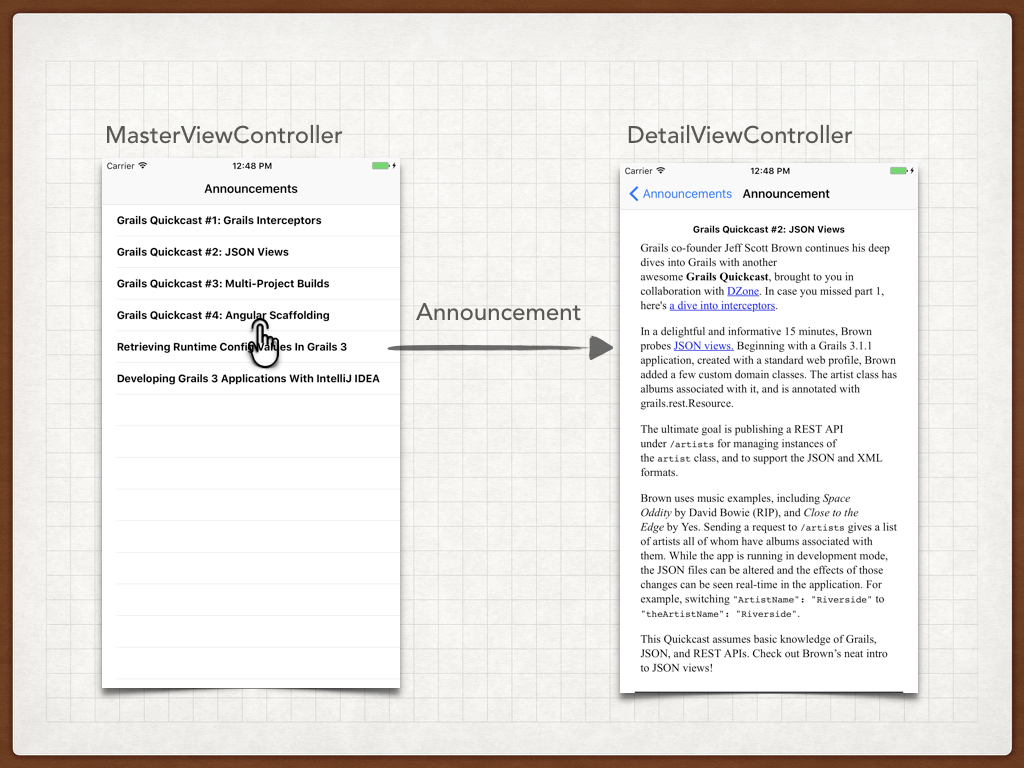
To render the announcement we use a UILabel and UIWebView which we wire up to IBOutlets in the StoryBoard as illustrated below:
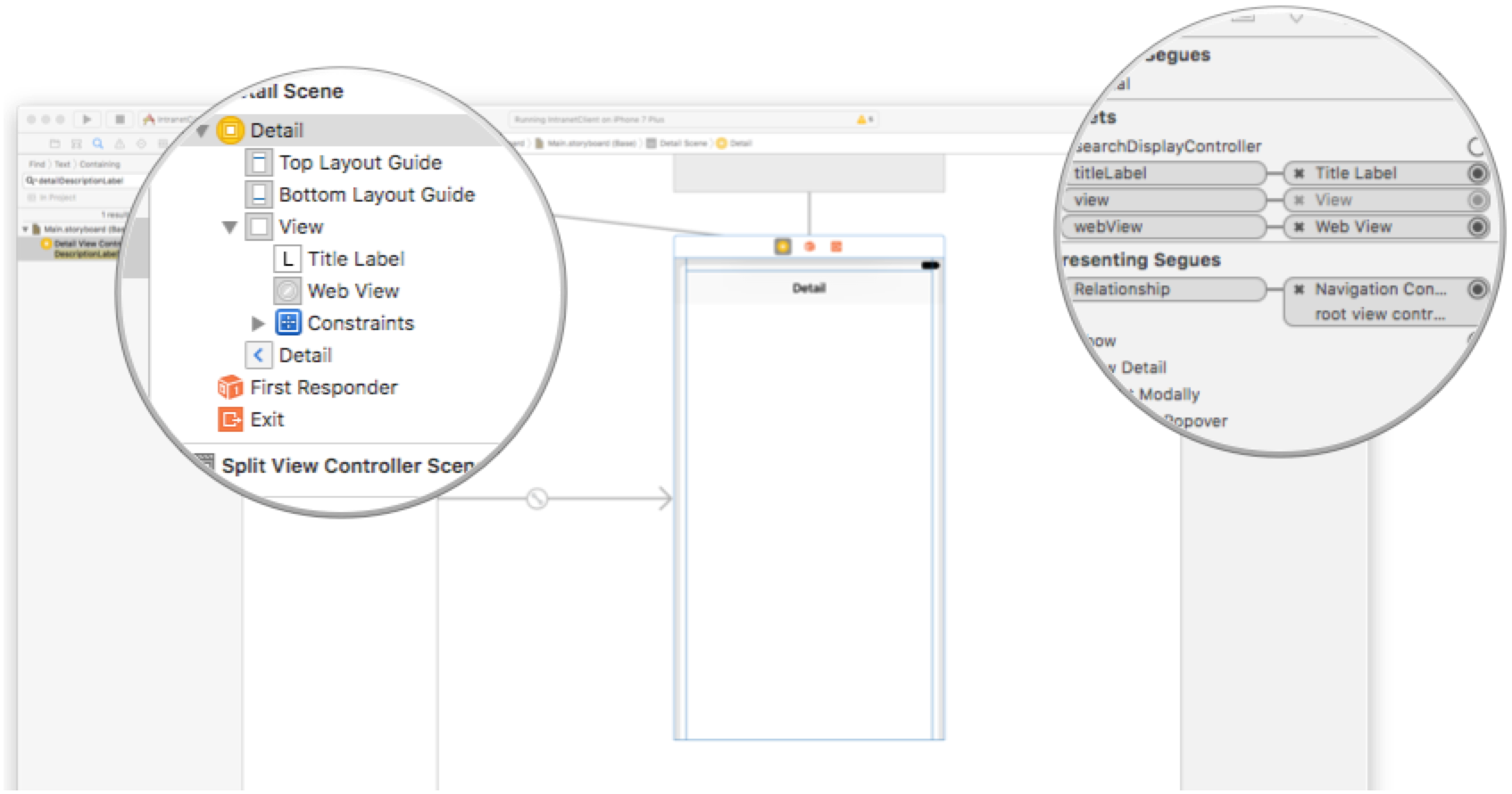
This is the complete DetailViewController code. There is no networking code involved.
import UIKit

class DetailViewController: UIViewController, UIWebViewDelegate {

    @IBOutlet weak var titleLabel: UILabel!
    @IBOutlet weak var webView: UIWebView!
    @IBOutlet weak var activityIndicatorView: UIActivityIndicatorView!

    func configureView() {
        // Update the user interface for the detail item.
        if let announcement = self.announcement {
            if let label = self.titleLabel {
                label.text = announcement.title
            }
            if let webView = self.webView, let body = announcement.body {
                self.hideActivityIndicator()
                webView.loadHTMLString(body, baseURL: nil)
            } else {
                self.hideActivityIndicator()
            }
        } else {
            self.hideActivityIndicator()
        }
    }

    func hideActivityIndicator() {
        if let activityIndicatorView  = self.activityIndicatorView {
            activityIndicatorView.stopAnimating()
        }
    }

    override func viewDidLoad() {
        super.viewDidLoad()
        // Do any additional setup after loading the view, typically from a nib.
        self.configureView()
    }

    var announcement: Announcement? {
        didSet {
            // Update the view.
            self.configureView()
        }
    }


    // MARK: - UIWebViewDelegate

    func webViewDidFinishLoad(_ webView: UIWebView) {
        self.hideActivityIndicator()
    }

    func webView(_ webView: UIWebView, didFailLoadWithError error: Error) {
        self.hideActivityIndicator()
    }
}
6 API version 2.0
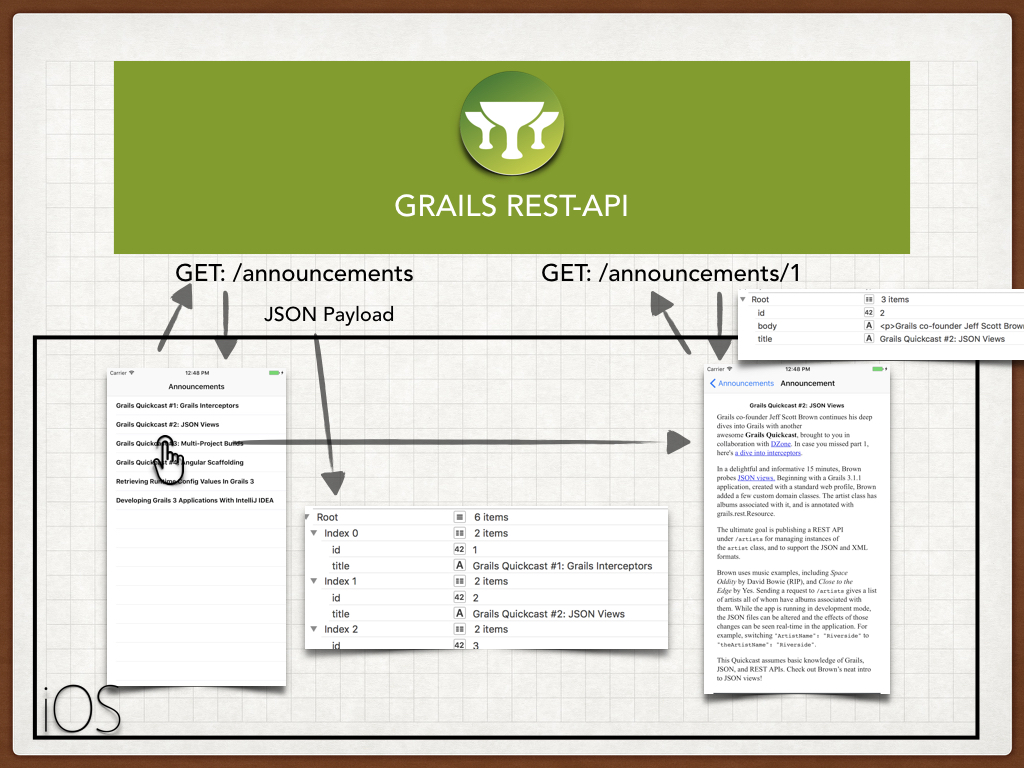
The problem with the first version of the API is that we include every announcement
body in the payload used to displayed the list. An announcement’s body can be a large block of HTML.
A user will probably just wants to check a couple of announcements. It will save bandwidth and
make the app faster if we don’t send the announcement body in the initial request. Instead, we will ask
the API for a complete announcement (including body) once the user taps the announcement.
6.1 Grails V2 Changes
We are going to use create a new Controller to handle the version 2 of the API. We are going to use a Criteria query with a projection to fetch only the id and title of the announcements.
package intranet.backend.v2

import grails.rest.RestfulController
import intranet.backend.Announcement

class AnnouncementController extends RestfulController<Announcement> {
    static namespace = 'v2'
    static responseFormats = ['json']

    def announcementService

    AnnouncementController() {
        super(Announcement)
    }

    def index(Integer max) {
        params.max = Math.min(max ?: 10, 100)
        def announcements = announcementService.findAllIdAndTitleProjections(params)
        respond announcements, model: [("${resourceName}Count".toString()): countResources()]
    }
}
We encapsulate the querying in a service
package intranet.backend

import grails.gorm.transactions.Transactional

@Transactional(readOnly = true)
class AnnouncementService {

    List<Map> findAllIdAndTitleProjections(Map params) {
        def c = Announcement.createCriteria()
        def announcements = c.list(params) {
            projections {
                property('id')
                property('title')
            }
        }.collect { [id: it[0], title: it[1]] } as List<Map>
    }
}
and we test it:
package intranet.backend

import grails.test.hibernate.HibernateSpec
import grails.testing.services.ServiceUnitTest

class AnnouncementServiceSpec extends HibernateSpec implements ServiceUnitTest<AnnouncementService> {

    def "test criteria query with projection returns a list of maps"() {

        when: 'Save some announcements'
        [new Announcement(title: 'Grails Quickcast #1: Grails Interceptors'),
        new Announcement(title: 'Grails Quickcast #2: JSON Views'),
        new Announcement(title: 'Grails Quickcast #3: Multi-Project Builds'),
        new Announcement(title: 'Grails Quickcast #4: Angular Scaffolding'),
        new Announcement(title: 'Retrieving Runtime Config Values In Grails 3'),
        new Announcement(title: 'Developing Grails 3 Applications With IntelliJ IDEA')].each {
            it.save()
        }

        then: 'announcements are saved'
        Announcement.count() == 6

        when: 'fetching the projection'
        def resp = service.findAllIdAndTitleProjections([:])

        then: 'there are six maps in the response'
        resp
        resp.size() == 6

        and: 'the maps contain only id and title'
        resp.each {
            it.keySet() == ['title', 'id'] as Set<String>
         }

        and: 'non empty values'
        resp.each {
            assert it.title
            assert it.id
        }

    }
}
Url Mapping
We need to map the version 2.0 of the Accept-Header to the namespace v2
        get "/announcements"(version:'2.0', controller: 'announcement', namespace:'v2')
        get "/announcements/$id(.$format)?"(version:'2.0', controller: 'announcement', action: 'show', namespace:'v2')
6.2 Api 2.0 Functional tests
We want to test the Api version 2.0 does not include the body property when receiving a GET request to the announcements endpoint. The next functional test verifies that behaviour.
{sourceDir}
package intranet.backend

import grails.testing.mixin.integration.Integration
import grails.testing.spock.OnceBefore
import grails.web.http.HttpHeaders
import io.micronaut.http.HttpRequest
import io.micronaut.http.HttpResponse
import io.micronaut.http.HttpStatus
import io.micronaut.http.client.HttpClient
import spock.lang.AutoCleanup
import spock.lang.Shared
import spock.lang.Specification


@Integration
        resp.headers.getFirst(HttpHeaders.CONTENT_TYPE).get() == 'application/json;charset=UTF-8'

        and: 'json payload contains an array of annoucements with id, title and body'
        resp.body().each {
            assert it.id
            assert it.title
            assert it.body (4)
        }
    }

    def "test body is NOT present in announcements json payload of Api 2.0"() {
        given:
        HttpRequest request = HttpRequest.GET("/announcements/").header("Accept-Version", "2.0")

        when: 'Requesting announcements for version 2.0'
        HttpResponse<List<Map>> resp = client.toBlocking().exchange(request, List)

        then: 'the request was successful'
        resp.status == HttpStatus.OK (3)

        and: 'the response is a JSON Payload'
        resp.headers.getFirst(HttpHeaders.CONTENT_TYPE).get() == 'application/json;charset=UTF-8'
and: 'json payload contains the complete announcement'| 1 | serverPort property is automatically injected. It contains the random port where the Grails app runs during the functional test |
| 2 | Body is not present in the JSON paylod |
Grails command test-app runs unit, integration and functional tests.
6.3 iOS V2 Changes
First we need to change the Api version constant defined in GrailsFetcher.h
struct GrailsApi {
    static let serverUrl = "http://192.168.1.40:8080"
    static let version = "2.0" (1)
    struct Announcements {
        static let Path = "announcements"
    }
}| 1 | uses Api version 2.0 |
In version 2.0 the Api does not return the body of the announcements. Instead of setting an announcement property we are going to set just the resource identifier(primary key) in the DetailViewController. We have changed the prepareForSegue:sender method in MasterViewController as illustrated below:
    override func prepare(for segue: UIStoryboardSegue, sender: Any?) {
        if segue.identifier == "showDetail" {
            let controller = (segue.destination as! UINavigationController).topViewController as! DetailViewController
            if let announcement = sender as? Announcement {
                controller.announcementPrimaryKey = announcement.primaryKey
            }
            controller.navigationItem.leftBarButtonItem = self.splitViewController?.displayModeButtonItem
            controller.navigationItem.leftItemsSupplementBackButton = true
        }
}| 1 | Instead of setting an object, we set an Int |
DetailViewController asks the server for a complete announcement; body included.
import UIKit

class DetailViewController: UIViewController, UIWebViewDelegate, AnnouncementFetcherDelegate {

    @IBOutlet weak var titleLabel: UILabel!
    @IBOutlet weak var webView: UIWebView!
    @IBOutlet weak var activityIndicatorView: UIActivityIndicatorView!

    let fetcher = AnnouncementFetcher()

    // MARK: - LifeCycle

    override func viewDidLoad() {
        super.viewDidLoad()
        self.fetcher.delegate = self
        self.configureView()
    }

    func configureView() {
        // Update the user interface for the detail item.
        if let announcement = self.announcement {
            if let label = self.titleLabel {
                label.text = announcement.title
            }
            if let webView = self.webView, let body = announcement.body {
                self.hideActivityIndicator()
                webView.loadHTMLString(body, baseURL: nil)
            } else {
                self.hideActivityIndicator()
            }
        }
    }

    var announcement: Announcement? {
        didSet {
            self.configureView()
        }
    }

    var announcementPrimaryKey: Int? {
        didSet {
            self.showActivityIndicator()
            self.fetcher.fetchAnnouncement(self.announcementPrimaryKey!)
        }
    }

    // MARK: - Private Methods
    func showActivityIndicator() {
        if let activityIndicatorView  = self.activityIndicatorView {
            activityIndicatorView.startAnimating()
        }
    }

    func hideActivityIndicator() {
        if let activityIndicatorView  = self.activityIndicatorView {
            activityIndicatorView.stopAnimating()
        }
    }


    // MARK: - UIWebViewDelegate

    func webViewDidFinishLoad(_ webView: UIWebView) {
        self.hideActivityIndicator()
    }

    func webView(_ webView: UIWebView, didFailLoadWithError error: Error) {
        self.hideActivityIndicator()
    }

    // Mark: - AnnouncementFetcherDelegate

    func announcementFetchingFailed() {

    }

    func announcementFetched(_ announcement: Announcement) {
        self.announcement = announcement
    }
}
It uses a new fetcher:
import Foundation

class AnnouncementFetcher : NSObject, URLSessionDelegate {

    weak var delegate: AnnouncementFetcherDelegate?
    let builder = AnnouncementBuilder()

    func fetchAnnouncement(_ primaryKey: Int) {
        let url = URL(string: "\(GrailsApi.serverUrl)/\(GrailsApi.Announcements.Path)/\(primaryKey)")!
        let req = NSMutableURLRequest(url:url)
        req.setValue(GrailsApi.version, forHTTPHeaderField: "Accept-Version") (1)
        let config = URLSessionConfiguration.default
        let session = URLSession(configuration: config, delegate: self, delegateQueue: OperationQueue.main)

        let task = session.dataTask(with: req as URLRequest) { (data, response, error) in
            if error != nil {
                if let delegate = self.delegate {
                    delegate.announcementFetchingFailed()
                }
                return
            }
            if let announcement = self.builder.announcementFromJSON(data) {
                if let delegate = self.delegate {
                    delegate.announcementFetched(announcement)
                }
            } else {
                if let delegate = self.delegate {
                    delegate.announcementFetchingFailed()
                }
            }

        }
        task.resume()

    }
}
We added a method to the builder to convert nework data to a single Announcement object
    func announcementFromJSON(_ data: Data?) -> Announcement? {
        let json = try? JSONSerialization.jsonObject(with: data!, options: [])
        if let dict = json as? Dictionary<String, AnyObject> {
            if let title = dict["title"] as? String, let primaryKey = dict["id"]  as? Int {
                let announcement = Announcement(primaryKey: primaryKey, title: title)
                if let body = dict["body"]  as? String {
                    announcement.body = body
                }
                return announcement

            }
        }
        return nil
    }
And a delegate protocol to indicate if the announcement has been fetched
protocol AnnouncementFetcherDelegate: class {

    func announcementFetchingFailed()

    func announcementFetched(_ announcement: Announcement)
}
7 Conclusion
Thanks to Grails ease of API versioning we can now support two iOS applications running different versions.
8 Do you need help with Grails?
Help with Apache Grails
Apache Grails is supported by an active community of contributors and the Apache Software Foundation. If you need help working through a guide, want to discuss the framework, or have run into something that looks like a bug, the channels below are the right place to start.
-
Slack - real-time conversation with the Apache Grails community.
-
Developer mailing list - design discussions and contributor coordination.
-
Users mailing list - end-user questions and answers.
-
Issue tracker on GitHub - file a bug or feature request against the framework.
For Grails plugins, see the matching project on the apache org or the plugin’s own GitHub repository.