

Sending Email from a Grails 8 Application (and Testing It)
Send mail over SMTP or through SendGrid / AWS SES, externalize configuration, and verify send interactions with Spock Spring integration tests, without live email.
Authors: Sergio del Amo, Sanjana
Grails Version: 4
1 Getting Started
1.1 What you will need
To complete this guide, you will need the following:
-
Some time on your hands
-
A decent text editor or IDE
-
JDK 11 or greater installed with
JAVA_HOMEconfigured appropriately
1.2 How to complete the guide
To get started do the following:
-
Download and unzip the source
or
-
Clone the Git repository:
git clone https://github.com/grails-guides/grails-email.git
The Grails guides repositories contain two folders:
-
initialInitial project. Often a simple Grails app with some additional code to give you a head-start. -
completeA completed example. It is the result of working through the steps presented by the guide and applying those changes to theinitialfolder.
To complete the guide, go to the initial folder
-
cdintograils-guides/grails-email/initial
and follow the instructions in the next sections.
You can go right to the completed example if you cd into grails-guides/grails-email/complete
|
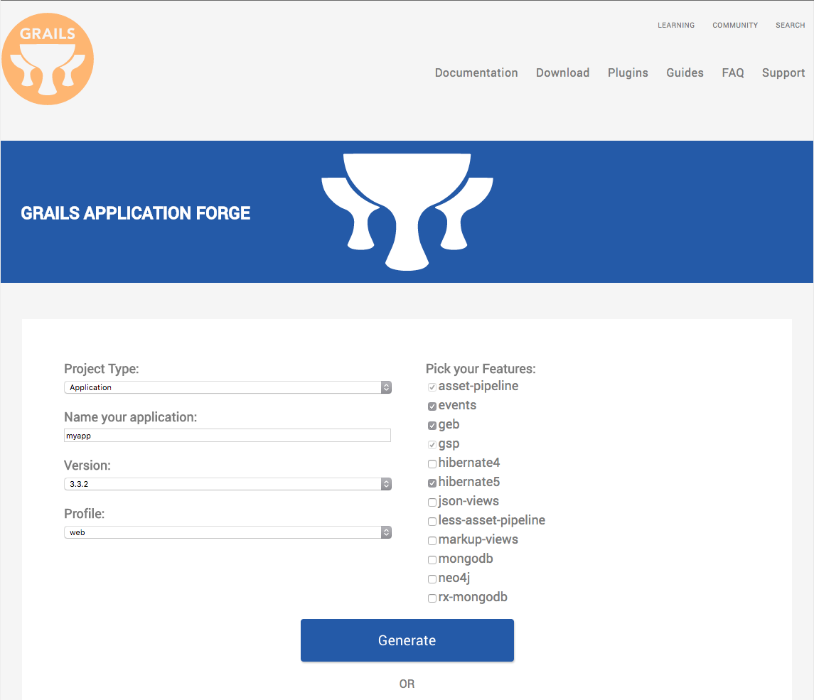
If you want to start from scratch, create a new Grails 3 application using Grails Application Forge.
2 Writing the App
Create an app with the rest-api profile
grails create-app example --profile=rest-api
2.1 Controller
Add an entry to UrlMappings:
package example.grails

class UrlMappings {

    static mappings = {
    ...
    ..
    .
        post "/mail/send"(controller: 'mail', action: 'send')
    }
}
Create MailController which use a collaborator, emailService to send and email.
package example.grails

import groovy.transform.CompileStatic
import groovy.util.logging.Slf4j

@Slf4j
@CompileStatic
class MailController {

    EmailService emailService

    static allowedMethods = [send: 'POST']

    def send(EmailCmd cmd) {
        if ( cmd.hasErrors() ) {
            render status: 422
            return
        }
        log.info '{}', cmd.toString()
        emailService.send(cmd)
        render status: 200
    }
}
The previous controller uses a command object:
package example.grails

import grails.compiler.GrailsCompileStatic
import grails.validation.Validateable
import groovy.transform.ToString

@ToString
@GrailsCompileStatic
class EmailCmd implements Validateable, Email {
    String recipient
    List<String> cc = []
    List<String> bcc = []
    String subject
    String htmlBody
    String textBody
    String replyTo

    static constraints = {
        recipient nullable: false (1)
        subject nullable: false  (2)
        htmlBody nullable: true
        textBody nullable: true, validator: { String val, EmailCmd obj ->  (3)
            !(!obj.htmlBody && !val)
        }
        replyTo nullable: true
    }
}| 1 | recipient is required |
| 2 | subject is required |
| 3 | You must specify either textBody or htmlBody |
2.2 Email Service
Create an interface - EmailService. Any email integration present in the application should implement it.
package example.grails

import groovy.transform.CompileStatic

@CompileStatic
interface EmailService {
    void send(Email email)
}package example.grails
import groovy.transform.CompileStatic
@CompileStatic
interface Email {
String getRecipient()
List<String> getCc()
List<String> getBcc()
String getSubject()
String getHtmlBody()
String getTextBody()
String getReplyTo()
}2.2.1 AWS SES
Amazon Simple Email Service (Amazon SES) is a cloud-based email sending service designed to help digital marketers and application developers send marketing, notification, and transactional emails. It is a reliable, cost-effective service for businesses of all sizes that use email to keep in contact with their customers.
There is a AWS SDK SES Grails plugin. However, in this guide we are going to integrate AWS SDK SES directly.
Add a dependency to AWS SES SDK:
compile 'software.amazon.awssdk:ses:2.10.24'Also, add configuration properties which can be passed via system properties / command line arguments:
aws:
    ses:
        source: '${AWS_SOURCE}'
        region: '${AWS_REGION}'
Create one service which encapsulates the integration with SES. There are several way to provide programmatic credentials.
The client searches for credentials using the default credentials provider chain, in the following order:
In the Java system properties: aws.accessKeyId and aws.secretKey.
In system environment variables: AWS_ACCESS_KEY_ID and AWS_SECRET_ACCESS_KEY.
In the default credentials file (the location of this file varies by platform).
In the Amazon ECS environment variable: AWS_CONTAINER_CREDENTIALS_RELATIVE_URI.
In the instance profile credentials, which exist within the instance metadata associated with the IAM role for the EC2 instance.
package example.grails

import grails.config.Config
import grails.core.support.GrailsConfigurationAware
import groovy.transform.CompileStatic
import groovy.util.logging.Slf4j
import software.amazon.awssdk.regions.Region
import software.amazon.awssdk.services.ses.SesClient
import software.amazon.awssdk.services.ses.model.Body
import software.amazon.awssdk.services.ses.model.Content
import software.amazon.awssdk.services.ses.model.Destination
import software.amazon.awssdk.services.ses.model.Message
import software.amazon.awssdk.services.ses.model.SendEmailRequest
import software.amazon.awssdk.services.ses.model.SendEmailResponse

@Slf4j
@CompileStatic
class AwsSesMailService implements EmailService, GrailsConfigurationAware {  (1)

    String sourceEmail

    SesClient sesClient

    @Override
    void setConfiguration(Config co) {

        String awsRegion = co.getProperty('aws.ses.region')
        if (!awsRegion) {
            throw new IllegalStateException('aws.ses.region not set')
        }
        this.sesClient = SesClient.builder().region(Region.of(awsRegion)).build();

        this.sourceEmail = co.getProperty('aws.ses.source', '')
        if (!this.sourceEmail) {
            log.warn('aws.sourceEmail not set')
        }
    }

    private Body bodyOfEmail(Email email) {
        if (email.htmlBody) {
            Content htmlBody = Content.builder().data(email.htmlBody).build()
            return Body.builder().html(htmlBody).build()
        }
        if (email.textBody) {
            Content textBody = Content.builder().data(email.textBody).build()
            return Body.builder().text(textBody).build()
        }
        Body.builder().build()
    }

    private Destination destination(Email email) {
        Destination.Builder destinationBuilder = Destination.builder().toAddresses(email.recipient)
        if ( email.getCc() ) {
            destinationBuilder = destinationBuilder.ccAddresses(email.getCc())
        }
        if ( email.getBcc() ) {
            destinationBuilder = destinationBuilder.bccAddresses(email.getBcc())
        }
        destinationBuilder.build()
    }

    private Message composeMessage(Email email) {
        Content subject = Content.builder().data(email.getSubject()).build()
        Body body = bodyOfEmail(email)
        Message.builder().subject(subject).body(body).build()
    }

    @Override
     void send(Email email) {
        try {
            Destination destination = destination(email)
            Message message = composeMessage(email)
            SendEmailRequest sendEmailRequest = SendEmailRequest.builder()
                    .source(sourceEmail)
                    .destination(destination)
                    .message(message)
                    .build()
            SendEmailResponse response = sesClient.sendEmail(sendEmailRequest)
            log.info("Email sent! {}", response.messageId())

        } catch (Exception ex) {
            log.warn("The email was not sent.")
            log.warn("Error message: {}", ex.message)
        }
    }
}| 1 | Retrieve configuration values with GrailsConfigurationAware |
2.2.2 SendGrid
SendGrid is a transactional email service.
SendGrid is responsible for sending billions of emails for some of the best and brightest companies in the world.
There is a SendGrid Grails Plugin. However, in this guide we are going to integrate AWS SDK SES directly.
Add a dependency to SendGrid SDK:
compile 'com.sendgrid:sendgrid-java:4.1.2'Add configuration properties which can be passed via system properties / command line arguments:
sendgrid:
    api: '${SENDGRID_APIKEY}'
    from: '${SENDGRID_FROM_EMAIL}'
Create a service which encapsulates the integration with SendGrid:
package example.grails

import com.sendgrid.Personalization
import com.sendgrid.Content
import com.sendgrid.Mail
import com.sendgrid.SendGrid
import com.sendgrid.Request
import com.sendgrid.Response
import com.sendgrid.Method
import grails.config.Config
import grails.core.support.GrailsConfigurationAware
import groovy.transform.CompileStatic
import groovy.util.logging.Slf4j

@Slf4j
@CompileStatic
class SendGridEmailService implements EmailService, GrailsConfigurationAware {  (1)

    String api

    String from

    @Override
    void setConfiguration(Config co) {
        this.api = co.getProperty('sendgrid.api', String)
        if (!this.api) {
            throw new IllegalStateException('sendgrid.api not set')
        }
        this.from = co.getProperty('sendgrid.from', String)
        if (!this.from) {
            throw new IllegalStateException('sendgrid.apiKey not set')
        }
    }

    @Override
    void send(Email email) {
        Mail mail = buildEmail(email)
        SendGrid sg = new SendGrid(api)
        Request request = new Request()
        try {
            request.with {
                method = Method.POST
                endpoint = "mail/send"
                body = mail.build()
            }
            Response response = sg.api(request)
            log.info("Status Code: {}", String.valueOf(response.getStatusCode()))
            log.info("Body: {}", response.getBody())
            if ( log.infoEnabled ) {
                response.getHeaders().each { String k, String v ->
                    log.info("Response Header {} => {}", k, v)
                }
            }

        } catch (IOException ex) {
            log.error(ex.getMessage())
        }
    }

    private Content contentOfEmail(Email email) {
        if ( email.textBody ) {
            return new Content("text/plain", email.textBody)
        }
        if ( email.htmlBody ) {
            return new Content("text/html", email.htmlBody)
        }
        return null
    }

    private Personalization buildPersonalization(Email email) {
        Personalization personalization = new Personalization()
        personalization.subject = email.subject

        com.sendgrid.Email to = new com.sendgrid.Email(email.recipient)
        personalization.addTo(to)

        if ( email.getCc() ) {
            for ( String cc : email.getCc() ) {
                com.sendgrid.Email ccEmail = new com.sendgrid.Email()
                ccEmail.email = cc
                personalization.addCc(ccEmail)
            }
        }
        if ( email.getBcc() ) {
            for ( String bcc : email.getBcc() ) {
                com.sendgrid.Email bccEmail = new com.sendgrid.Email()
                bccEmail.email = bcc
                personalization.addBcc(bccEmail)
            }
        }
        personalization
    }

    private Mail buildEmail(Email email) {
        Personalization personalization = buildPersonalization(email)
        Mail mail = new Mail()
        com.sendgrid.Email from = new com.sendgrid.Email()
        from.email = from
        mail.from = from
        mail.addPersonalization(personalization)
        Content content = contentOfEmail(email)
        mail.addContent(content)
        mail
    }
}| 1 | Retrieve configuration values with GrailsConfigurationAware |
2.3 Resources
Grails integrates with and builds on the Spring Framework.
You can easily register new (or override existing) beans by configuring them in grails-app/conf/spring/resources.groovy which uses the Grails Spring DSL.
Depending on the presence of the required system properties we are going to enable SendGrid or AWS SES integration.
import example.grails.AwsSesMailService
import example.grails.SendGridEmailService

beans = {
    if ( System.getProperty('SENDGRID_FROM_EMAIL') && System.getProperty('SENDGRID_APIKEY') ) {
        emailService(SendGridEmailService)
    } else if (System.getProperty('AWS_REGION') && System.getProperty('AWS_SOURCE')) {
        emailService(AwsSesMailService)
    }
}
Add a logger to get more visibility:
...
..
.
logger('example.grails', INFO, ['STDOUT'], false)
To use SendGrid, start the app with the necessary system properties:
$ ./gradlew -DSENDGRID_FROM_EMAIL=email@email.com -DSENDGRID_APIKEY=XXXXXX bootRunTo use AWS SES, start the app with the necessary system properties:
$ export AWS_ACCESS_KEY_ID=XXXXXXXX
$ export AWS_SECRET_ACCESS_KEY=XXXXXXXX
$ ./gradlew -DAWS_REGION=eu-west-1 -DAWS_SOURCE=email@email.com  bootRun
2.4 Test
In our acceptance test we don’t want bean emailService to be SendGridEmailService or AwsSesMailService. Instead we want it to be a Mock which we can verify interactions against.
The spock-spring module provides support for defining Spock mocks and stubs as Spring beans.
Add a dependency to spock-spring:
testCompile 'org.spockframework:spock-spring:1.3-groovy-2.5'First, you need to annotate Application.groovy with @ComponentScan.
package example.grails

import grails.boot.GrailsApp
import grails.boot.config.GrailsAutoConfiguration
import groovy.transform.CompileStatic
import org.springframework.context.annotation.ComponentScan

@ComponentScan('example.grails')
@CompileStatic
class Application extends GrailsAutoConfiguration {
    static void main(String[] args) {
        GrailsApp.run(Application, args)
    }
}
In the next test, we use an embedded config annotated with @TestConfiguration. We create an EmailService mock using a DetachedMockFactory.
package example.grails

import grails.testing.mixin.integration.Integration
import grails.testing.spock.OnceBefore
import io.micronaut.http.HttpStatus
import org.springframework.boot.test.context.TestConfiguration
import org.springframework.context.annotation.Bean
import spock.lang.Shared
import io.micronaut.http.HttpRequest
import io.micronaut.http.HttpResponse
import io.micronaut.http.client.HttpClient
import spock.lang.Specification
import spock.mock.DetachedMockFactory

@Integration
class MailControllerSpec extends Specification {

    @Shared
    HttpClient client

    EmailService emailService

    @OnceBefore
    void init() {
        String baseUrl = "http://localhost:$serverPort"
        this.client  = HttpClient.create(baseUrl.toURL())
    }

    def "/mail/send interacts once email service"() {
        when:
        HttpRequest request = HttpRequest.POST('/mail/send', [
                subject: 'Test',
                recipient: 'delamos@grails.example',
                textBody: 'Hola hola'
        ])
        HttpResponse resp = client.toBlocking().exchange(request)

        then:
        resp.status == HttpStatus.OK
        1 * emailService.send(_) (1)
    }

    @TestConfiguration
    static class EmailServiceConfiguration {
        private DetachedMockFactory factory = new DetachedMockFactory()

        @Bean
        EmailService emailService() {
            factory.Mock(EmailService)
        }
    }
}| 1 | emailService.send method is invoked once. |
Learn more about Spring Spock integration in Spock documentation.
3 Do you need help with Grails?
Help with Apache Grails
Apache Grails is supported by an active community of contributors and the Apache Software Foundation. If you need help working through a guide, want to discuss the framework, or have run into something that looks like a bug, the channels below are the right place to start.
-
Slack - real-time conversation with the Apache Grails community.
-
Developer mailing list - design discussions and contributor coordination.
-
Users mailing list - end-user questions and answers.
-
Issue tracker on GitHub - file a bug or feature request against the framework.
For Grails plugins, see the matching project on the apache org or the plugin’s own GitHub repository.