

Grails Multi-datasource
Learn how to consume and handle transactions to multiple data sources from a Grails application.
Authors: Sergio del Amo, Sanjana
Grails Version: 8
1 Getting Started
In this guide you connect a Grails 8 REST API to two data sources and handle transactions against each of them.
1.1 What you will need
-
Approximately 45 minutes
-
JDK 21 (Apache Grails 8 requires Java 21)
-
A text editor or IDE
-
The Gradle wrapper bundled in
initial/andcomplete/
1.2 How to complete the guide
Clone the companion and start from initial/:
git clone -b grails8 https://github.com/grails-guides/grails-multi-datasource.git
cd grails-multi-datasource/initial
./gradlew test
initial/ is a Grails 8 REST API starter (rest-api profile, Hibernate, H2, JSON views). You will add a second datasource, domains, services, controllers, views, and a functional test. To skip ahead, use complete/.
2 Writing the Application
We are writing a Grails application using the rest-api profile that connects to two data sources.
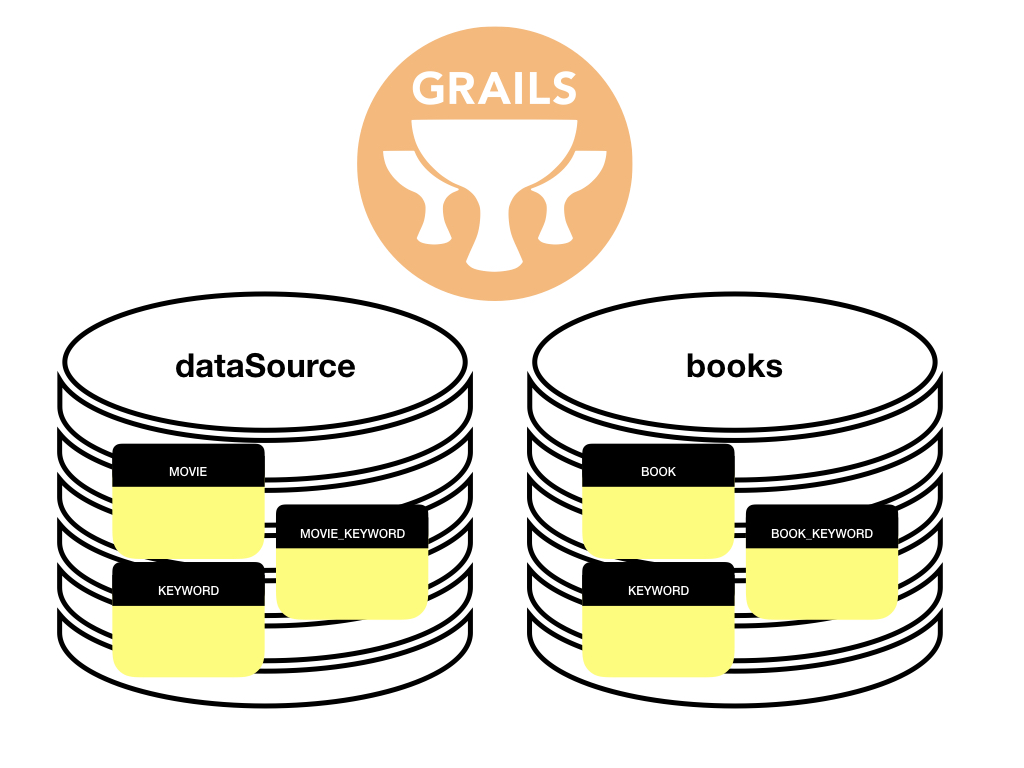
In older Grails releases a best-effort transaction chain tried to manage a transaction across every configured data source. That is not a true XA transaction and it costs performance, so it is not used here. Declare the data source you need on @Transactional / @ReadOnly (or use withConnection) instead.
|
2.1 Configuration
Wire up the default data source and a second books data source in application.yml:
dataSource:
  driverClassName: org.h2.Driver
  username: sa
  password: ''
  pooled: true
  jmxExport: true
environments:
  development:
    dataSource:
      dbCreate: create-drop
      url: jdbc:h2:mem:devDb;LOCK_TIMEOUT=10000;DB_CLOSE_ON_EXIT=FALSE
    dataSources:
      books:
        dbCreate: create-drop
        url: jdbc:h2:mem:bookDevDb;LOCK_TIMEOUT=10000;DB_CLOSE_ON_EXIT=FALSE
  test:
    dataSource:
      dbCreate: create-drop
      url: jdbc:h2:mem:testDb;LOCK_TIMEOUT=10000;DB_CLOSE_ON_EXIT=FALSE
    dataSources:
      books:
        dbCreate: create-drop
        url: jdbc:h2:mem:bookTestDb;LOCK_TIMEOUT=10000;DB_CLOSE_ON_EXIT=FALSE
  production:
    dataSource:
      dbCreate: none
      url: jdbc:h2:./prodDb;LOCK_TIMEOUT=10000;DB_CLOSE_ON_EXIT=FALSE
    dataSources:
      books:
        dbCreate: none
        url: jdbc:h2:./bookProdDb;LOCK_TIMEOUT=10000;DB_CLOSE_ON_EXIT=FALSE
2.2 Domain Classes
Create a Movie domain class. If you do not specify a data source, it uses the default data source.
package demo

class Movie {
    String title
    static hasMany = [keywords: Keyword]
}
Create a Book domain class.
package demo

class Book {
    String title

    static hasMany = [keywords: Keyword]

    static mapping = {
        datasource 'books' (1)
    }
}| 1 | The Book domain class is associated with the books data source. |
Create a Keyword domain class.
package demo

import org.grails.datastore.mapping.core.connections.ConnectionSource

class Keyword {
    String name

    static mapping = {
        datasources([ConnectionSource.DEFAULT, 'books']) (1)
    }
}| 1 | The Keyword domain class is associated with both data sources (the default dataSource and books). |
2.3 Services
Create a Data Service for Movie:
package demo

import grails.gorm.services.Join
import grails.gorm.services.Service
import groovy.transform.CompileStatic

@CompileStatic
@Service(Movie)
interface MovieDataService {

    void deleteByTitle(String title)

    @Join('keywords') (1)
    List<Movie> findAll()
}| 1 | You can specify query joins with the @Join annotation. |
Add a regular service:
package demo

import grails.gorm.transactions.Transactional
import groovy.transform.CompileStatic
import groovy.util.logging.Slf4j

@Slf4j
@CompileStatic
class MovieService {

    @Transactional
    Movie addMovie(String title, List<String> keywords) {
        Movie movie = new Movie(title: title)
        if (keywords) {
            for (String keyword : keywords) {
                movie.addToKeywords(new Keyword(name: keyword))
            }
        }
        if (!movie.save()) {
            log.error 'Unable to save movie'
        }
        movie
    }
}package demo
import grails.gorm.services.Join
import grails.gorm.services.Service
import grails.gorm.transactions.ReadOnly
import grails.gorm.transactions.Transactional
import groovy.transform.CompileStatic
@CompileStatic
@Service(Book)
interface BookDataService {
@Join('keywords') (2)
@ReadOnly('books') (1)
List<Book> findAll()
@Transactional('books') (1)
void deleteByTitle(String title)
}| 1 | Specify the data source name in @Transactional and @ReadOnly. |
| 2 | You can specify query joins with the @Join annotation. |
If you use @ReadOnly instead of @ReadOnly('books') you will get org.hibernate.HibernateException: No Session found for current thread.
|
Add a regular service:
package demo

import grails.gorm.transactions.Transactional
import groovy.util.logging.Slf4j

@Slf4j
class BookService {

    @Transactional('books') (1)
    Book addBook(String title, List<String> keywords) {
        Book book = new Book(title: title)
        if (keywords) {
            for (String keyword : keywords) {
                Keyword keywordInstance = new Keyword(name: keyword)
                keywordInstance.books.save() (2)
                book.addToKeywords(keywordInstance)
            }
        }
        if (!book.save()) {
            log.error 'Unable to save book'
        }
        book
    }
}| 1 | Specify the data source name in @Transactional. |
| 2 | Keyword is mapped to both datasources and defaults to ConnectionSource.DEFAULT. Save it on the books connection so Hibernate does not flush it on the default session (which has no transaction here). |
Add a Keyword service that works with multiple data sources.
The first data source listed on a domain class is the default when you do not use an explicit connection. For Keyword, ConnectionSource.DEFAULT is used by default.
package demo

import grails.gorm.DetachedCriteria
import grails.gorm.transactions.ReadOnly
import groovy.transform.CompileStatic

@CompileStatic
class KeywordService {

    @ReadOnly('books')
    List<Keyword> findAllBooksKeywords() {
        booksQuery().list()
    }

    @ReadOnly
    List<Keyword> findAllDefaultDataSourceKeywords() {
        defaultDataSourceQuery().list()
    }

    private DetachedCriteria<Keyword> booksQuery() {
        Keyword.where {}.withConnection('books') (1)
    }

    private DetachedCriteria<Keyword> defaultDataSourceQuery() {
        Keyword.where {}
    }
}| 1 | Specify the data source name with withConnection for a query. |
You could write the books query with a dynamic finder or a criteria query instead of a where query:
Where query: Keyword.where {}.withConnection('books').list()
Dynamic finder: Keyword.books.findAll()
Criteria: Keyword.books.createCriteria().list { }
2.4 Controllers
Create BookController and MovieController. They consume the services from the previous step.
package demo

import grails.compiler.GrailsCompileStatic
import grails.validation.Validateable

@GrailsCompileStatic
class SaveBookCommand implements Validateable {
    String title
    List<String> keywords

    static constraints = {
        title nullable: false
        keywords nullable: true
    }
}package demo
import groovy.transform.CompileStatic
@CompileStatic
class BookController {
static allowedMethods = [save: 'POST', index: 'GET', delete: 'DELETE']
static responseFormats = ['json']
BookService bookService
KeywordService keywordService
BookDataService bookDataService
def save(SaveBookCommand cmd) {
bookService.addBook(cmd.title, cmd.keywords)
render status: 201
}
def index() {
[bookList: bookDataService.findAll()]
}
def delete(String title) {
bookDataService.deleteByTitle(title)
render status: 204
}
def keywords() {
render view: '/keyword/index',
model: [keywordList: keywordService.findAllBooksKeywords()]
}
}package demo
import grails.compiler.GrailsCompileStatic
import grails.validation.Validateable
@GrailsCompileStatic
class SaveMovieCommand implements Validateable {
String title
List<String> keywords
static constraints = {
title nullable: false
keywords nullable: true
}
}package demo
import groovy.transform.CompileStatic
@CompileStatic
class MovieController {
static allowedMethods = [save: 'POST', index: 'GET', delete: 'DELETE']
static responseFormats = ['json']
MovieService movieService
MovieDataService movieDataService
KeywordService keywordService
def save(SaveMovieCommand cmd) {
movieService.addMovie(cmd.title, cmd.keywords)
render status: 201
}
def index() {
[movieList: movieDataService.findAll()]
}
def delete(String title) {
movieDataService.deleteByTitle(title)
render status: 204
}
def keywords() {
render view: '/keyword/index',
model: [keywordList: keywordService.findAllDefaultDataSourceKeywords()]
}
}2.5 Views
Add JSON Views to render the output.
import demo.Book

model {
    Book book
}

json {
    title book.title
    keywords book.keywords*.name.unique().sort()
}import demo.Book
model {
Iterable<Book> bookList
}
json tmpl.book(bookList)import demo.Movie
model {
Movie movie
}
json {
title movie.title
keywords movie.keywords*.name.unique().sort()
}import demo.Movie
model {
Iterable<Movie> movieList
}
json tmpl.movie(movieList)import demo.Keyword
model {
Iterable<Keyword> keywordList
}
json {
keywords keywordList*.name.unique().sort()
}2.6 Functional Test
Add a functional test that verifies Grails handles multiple data sources as expected. The companion uses java.net.http.HttpClient (no extra HTTP-client dependency):
package demo

import grails.testing.mixin.integration.Integration
import groovy.json.JsonOutput
import groovy.json.JsonSlurper
import spock.lang.Shared
import spock.lang.Specification

import java.net.http.HttpClient
import java.net.http.HttpRequest
import java.net.http.HttpResponse

@Integration
class MultipleDataSourceSpec extends Specification {

    @Shared
    HttpClient client = HttpClient.newHttpClient()

    private HttpResponse<String> saveResource(String resource, String itemTitle, List<String> itemKeywords) {
        String body = JsonOutput.toJson([title: itemTitle, keywords: itemKeywords])
        HttpRequest request = HttpRequest.newBuilder()
                .uri(URI.create("http://localhost:${serverPort}/${resource}"))
                .header('Content-Type', 'application/json')
                .header('Accept', 'application/json')
                .POST(HttpRequest.BodyPublishers.ofString(body))
                .build()
        client.send(request, HttpResponse.BodyHandlers.ofString())
    }

    private HttpResponse<String> deleteResource(String resource, String itemTitle) {
        String encoded = URLEncoder.encode(itemTitle, 'UTF-8')
        HttpRequest request = HttpRequest.newBuilder()
                .uri(URI.create("http://localhost:${serverPort}/${resource}?title=${encoded}"))
                .header('Accept', 'application/json')
                .DELETE()
                .build()
        client.send(request, HttpResponse.BodyHandlers.ofString())
    }

    private HttpResponse<String> fetchResource(String resource) {
        HttpRequest request = HttpRequest.newBuilder()
                .uri(URI.create("http://localhost:${serverPort}/${resource}"))
                .header('Accept', 'application/json')
                .GET()
                .build()
        client.send(request, HttpResponse.BodyHandlers.ofString())
    }

    private HttpResponse<String> resourceKeywords(String resource) {
        HttpRequest request = HttpRequest.newBuilder()
                .uri(URI.create("http://localhost:${serverPort}/${resource}/keywords"))
                .header('Accept', 'application/json')
                .GET()
                .build()
        client.send(request, HttpResponse.BodyHandlers.ofString())
    }

    def 'Test Multi-Datasource support saving and retrieving books and movies'() {
        given:
        List<Map> books = [
                [title: 'Change Agent', tags: ['dna', 'sci-fi']],
                [title: 'Influx', tags: ['sci-fi']],
                [title: 'Kill Decision', tags: ['drone', 'sci-fi']],
                [title: 'Freedom (TM)', tags: ['sci-fi']],
                [title: 'Daemon', tags: ['sci-fi']],
        ]
        List<Map> movies = [
                [title: 'Pirates of Silicon Valley', tags: ['apple', 'microsoft', 'technology']],
                [title: 'Inception', tags: ['sci-fi']],
        ]
        books.each { book ->
            HttpResponse<String> saveResp = saveResource('book', book.title as String, book.tags as List<String>)
            assert saveResp.statusCode() == 201
        }
        movies.each { movie ->
            HttpResponse<String> saveResp = saveResource('movie', movie.title as String, movie.tags as List<String>)
            assert saveResp.statusCode() == 201
        }

        when:
        HttpResponse<String> resourceResp = fetchResource('book')
        List bookBody = new JsonSlurper().parseText(resourceResp.body()) as List

        then:
        resourceResp.statusCode() == 200
        bookBody.collect { it.title }.sort() == books.collect { it.title }.sort()

        when:
        resourceResp = fetchResource('movie')
        List movieBody = new JsonSlurper().parseText(resourceResp.body()) as List

        then:
        resourceResp.statusCode() == 200
        movieBody.collect { it.title }.sort() == movies.collect { it.title }.sort()

        when:
        HttpResponse<String> resp = resourceKeywords('book')
        Map bookKeywords = new JsonSlurper().parseText(resp.body()) as Map

        then:
        resp.statusCode() == 200
        (bookKeywords.keywords as List<String>).sort() == books.collect { it.tags }.flatten().unique().sort()

        when:
        resp = resourceKeywords('movie')
        Map movieKeywords = new JsonSlurper().parseText(resp.body()) as Map

        then:
        resp.statusCode() == 200
        (movieKeywords.keywords as List<String>).sort() == movies.collect { it.tags }.flatten().unique().sort()

        cleanup:
        books.each { book ->
            assert deleteResource('book', book.title as String).statusCode() == 204
        }
        movies.each { movie ->
            assert deleteResource('movie', movie.title as String).statusCode() == 204
        }
    }
}
3 Testing the Application
From complete/ (or your finished initial/):
./gradlew test
./gradlew integrationTest
4 Help with Grails
Help with Apache Grails
Apache Grails is supported by an active community of contributors and the Apache Software Foundation. If you need help working through a guide, want to discuss the framework, or have run into something that looks like a bug, the channels below are the right place to start.
-
Slack - real-time conversation with the Apache Grails community.
-
Developer mailing list - design discussions and contributor coordination.
-
Users mailing list - end-user questions and answers.
-
Issue tracker on GitHub - file a bug or feature request against the framework.
For Grails plugins, see the matching project on the apache org or the plugin’s own GitHub repository.