

How to change languages in a Grails app?
Learn how to change the default language used in your application, switch between languages or access the current locale.
Authors: Sergio del Amo
Grails Version: 4
1 Grails Training
Apache Grails Training
Apache Grails is now part of the Apache Software Foundation. The community-maintained training catalog is being migrated; in the meantime see the Learning page for current resources, recorded talks, and links to other community-supplied training material.
2 Getting Started
In this guide you are going to learn how to create an app whose interface is translated in four languages.
You will learn how to change the default language used in your application and how to switch between languages while using the app.
2.1 What you will need
To complete this guide, you will need the following:
-
Some time on your hands
-
A decent text editor or IDE
-
JDK 11 or greater installed with
JAVA_HOMEconfigured appropriately
2.2 How to complete the guide
To get started do the following:
-
Download and unzip the source
or
-
Clone the Git repository:
git clone https://github.com/grails-guides/grails_i18n.git
The Grails guides repositories contain two folders:
-
initialInitial project. Often a simple Grails app with some additional code to give you a head-start. -
completeA completed example. It is the result of working through the steps presented by the guide and applying those changes to theinitialfolder.
To complete the guide, go to the initial folder
-
cdintograils-guides/grails_i18n/initial
and follow the instructions in the next sections.
You can go right to the completed example if you cd into grails-guides/grails_i18n/complete
|
3 Writing the Application
Grails supports Internationalization (i18n) out of the box by leveraging the underlying Spring MVC internationalization support. With Grails you are able to customize the text that appears in a view based on the user’s Locale
3.1 Message Bundles
Message bundles in Grails are located inside the grails-app/i18n directory and
are simple Java properties files.
We want to support English, Spanish, Italian and German in our application. We are going to define the localizations in the different message bundles.
Default Message Bundle
link:{sourcedir}/grails-app/i18n/messages.properties[role=include]

link:{sourcedir}/grails-app/i18n/messages.properties[role=include]

link:{sourcedir}/grails-app/i18n/messages.properties[role=include]
Spanish Message Bundle
link:{sourcedir}/grails-app/i18n/messages_es.properties[role=include]

link:{sourcedir}/grails-app/i18n/messages_es.properties[role=include]

link:{sourcedir}/grails-app/i18n/messages_es.properties[role=include]
Italian Message Bundle
link:{sourcedir}/grails-app/i18n/messages_it.properties[role=include]

link:{sourcedir}/grails-app/i18n/messages_it.properties[role=include]

link:{sourcedir}/grails-app/i18n/messages_it.properties[role=include]
German Message Bundle
link:{sourcedir}/grails-app/i18n/messages_de.properties[role=include]

link:{sourcedir}/grails-app/i18n/messages_de.properties[role=include]

link:{sourcedir}/grails-app/i18n/messages_de.properties[role=include]
In the home page we use those message codes:
link:{sourcedir}/grails-app/views/index.gsp[role=include]3.2 Change Locale
You can switch locales by simply passing a parameter called lang to Grails as a request parameter:
/?lang=es
Grails will automatically switch the user’s locale and store it in a cookie so subsequent requests will have the new header.
We can verify this behaviour with a Functional Test:
link:{sourcedir}/src/integration-test/groovy/demo/ChangeLocaleSpec.groovy[role=include]3.3 Changing Default Locale
We want our app to startup and by default use Spanish
link:{sourcedir}/grails-app/conf/spring/resources.groovy[role=include]We can verify the default locale is Spanish with a Functional Test:
link:{sourcedir}/src/integration-test/groovy/demo/DefaultLocaleSpec.groovy[role=include]3.4 Locale Navbar
We define the supported languages in a configuration property:
link:{sourcedir}/grails-app/conf/application.yml[role=include]We are going to use a Tag Library to render a languages dropdown:
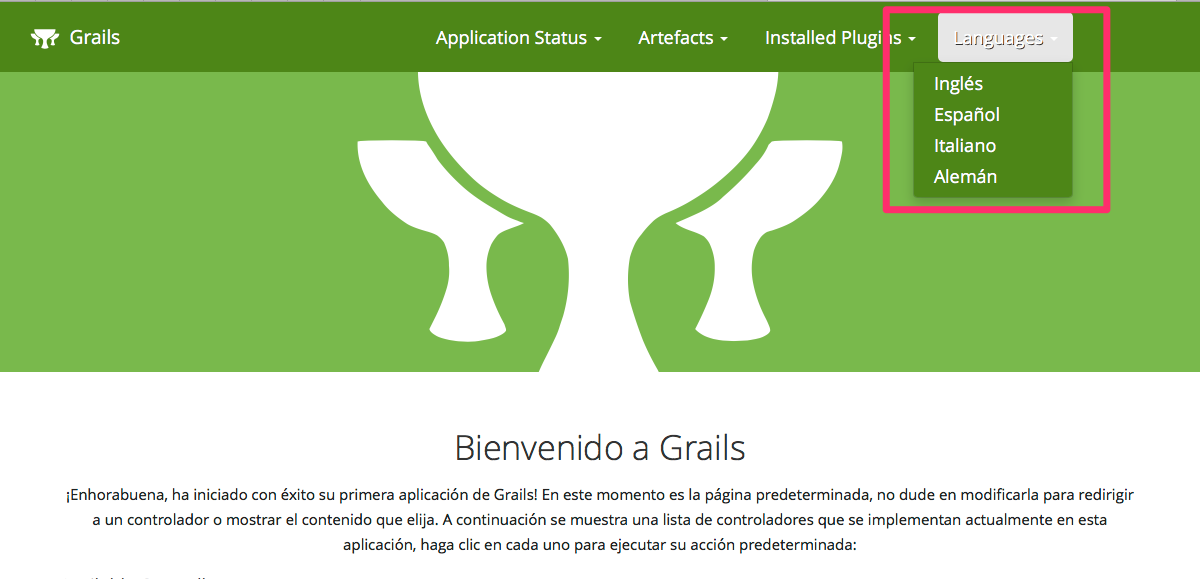
link:{sourcedir}/grails-app/taglib/demo/LocaleNavbarTagLib.groovy[role=include]| 1 | Retrieve configuration property |
| 2 | Access current locale |
| 3 | Retrieving a localized message |
We can test the TagLib rendering with a Unit Test.
link:{sourcedir}/src/test/groovy/demo/LocaleNavbarTagLibSpec.groovy[role=include]We invoke the TagLib inside the <content> element of the default GSP.
link:{sourcedir}/grails-app/views/index.gsp[role=include]We supply to the Tag Lib the request.forwardURI
forwardURI - Useful for obtaining the current request URI since the request object’s requestURI property returns the original URI, not the matched one.
4 Running the Application
To run the tests:
./grailsw
grails> test-app
grails> open test-report
or
./gradlew check
open build/reports/tests/index.html
To run the application use the ./gradlew bootRun command which will start the application on port 8080.
5 Do you need help with Grails?
Help with Apache Grails
Apache Grails is supported by an active community of contributors and the Apache Software Foundation. If you need help working through a guide, want to discuss the framework, or have run into something that looks like a bug, the channels below are the right place to start.
-
Slack - real-time conversation with the Apache Grails community.
-
Developer mailing list - design discussions and contributor coordination.
-
Users mailing list - end-user questions and answers.
-
Issue tracker on GitHub - file a bug or feature request against the framework.
For Grails plugins, see the matching project on the apache org or the plugin’s own GitHub repository.